Buyer-led purchasing
The person who understands the requirement builds the cart in the storefront.
 ApproveCart B2B
 Shopify B2B purchase approval
Company buyers build carts in the storefront, submit them to an approver, refine them while pending, and return to the final approved cart before checkout.
The problem
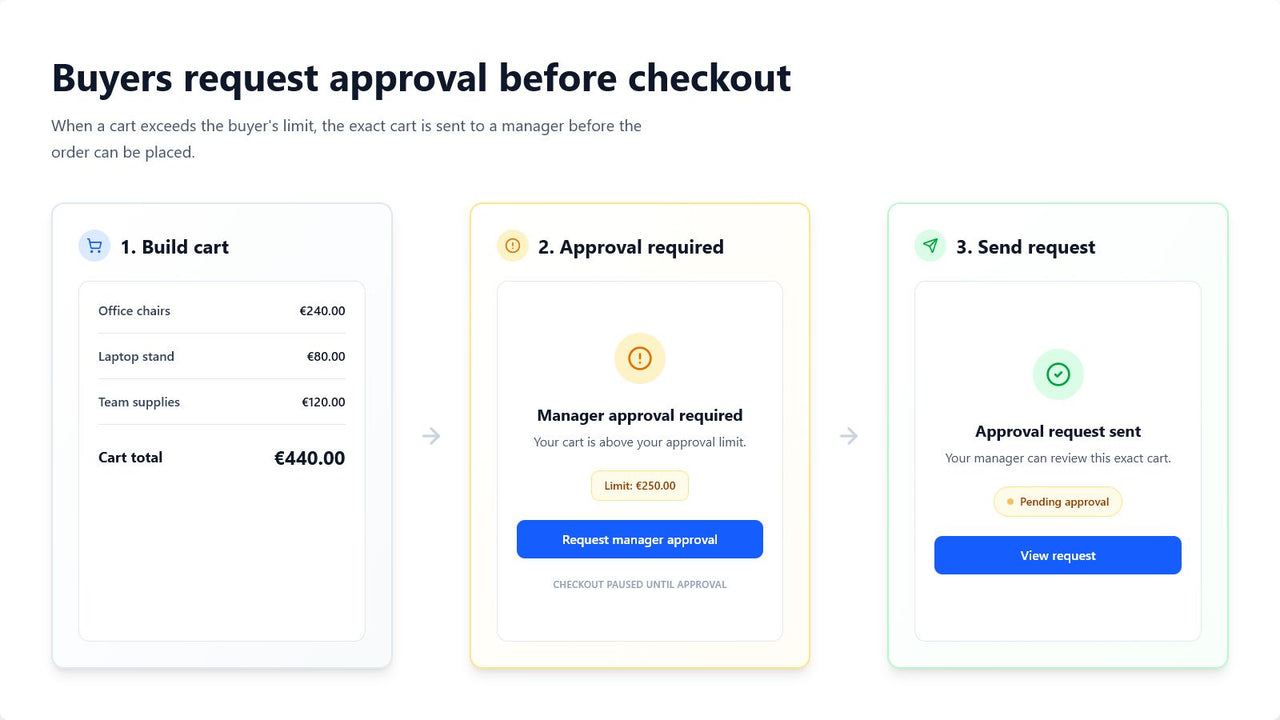
A buyer may be authorized to shop for a company without being authorized to commit every purchase. ApproveCart adds that missing checkpoint without asking the merchant to rebuild the order manually.
The person who understands the requirement builds the cart in the storefront.
An assigned approver reviews the purchase for the same B2B company.
The approval state is checked again when the buyer reaches checkout.
End-to-end flow
The workflow stays connected to the buyer, company, approver, and editable pending cart throughout the decision.
The buyer shops with their Shopify B2B company account.
The buyer or assigned approver can adjust quantities, remove items, or add products from the company catalog.
The assigned approver receives an email with the request details and a link to review it.
The buyer restores the final approved cart and checkout protection validates that exact version.
After approval or rejection, the buyer receives the decision by email.
Buyer experience
The buyer sees why approval is required, selects an available company approver, and can include a note. While the request is pending, the buyer can adjust quantities, remove items, or add products from the company-location catalog.
Approver experience
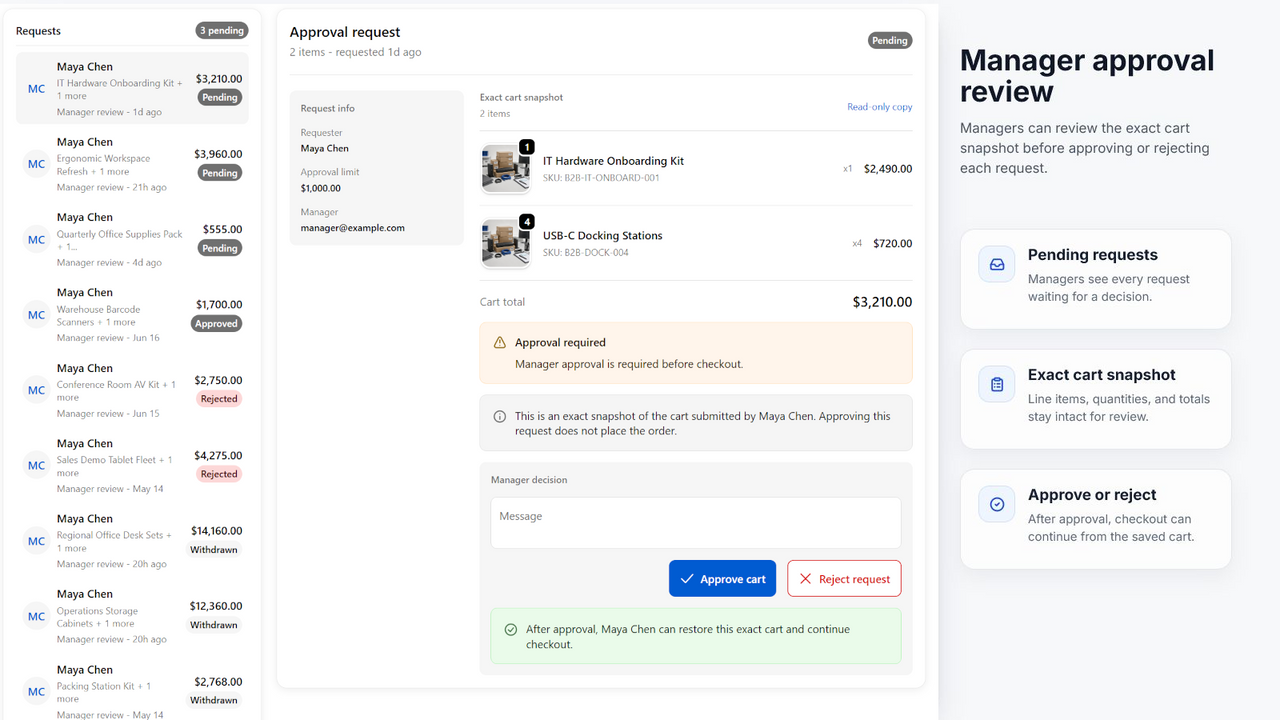
An active approver for the same company reviews the cart and context, can adjust quantities, remove items, or add company-catalog products, and then approves or rejects the final saved version.
After approval
Saved edits made while pending are part of the approval. The buyer restores that final cart, and ApproveCart confirms it still matches the protected values at checkout.
Approval triggers
Spend thresholds cover the common policy. Growth adds rules for product, collection, company, location, customer role or tag, total, and line quantity conditions.
Apply a default policy, a company policy, or an individual buyer override.
Explore spend limitsTarget particular products, collections, companies, locations, roles, tags, totals, or quantities on Growth.
Read rule documentationOperational record
ApproveCart stores request state, buyer and approver context, requested line items, notes, timestamps, and the resulting order reference when available.
This provides an application-level audit trail for the approval workflow. It is not a replacement for your organization's accounting, procurement, or legal record-keeping requirements.
Review stored dataPurchase approval FAQ
Yes. ApproveCart lets a signed-in buyer submit the current cart to a company approver before the buyer can continue to checkout.
The approver sees the requested products, variants, quantities, subtotal, buyer, company context, and the buyer's note. Before approving, the approver can adjust quantities, remove items, or add products from the company-location catalog.
Yes. The buyer and assigned approver can edit the pending cart and save the changes without creating another request. Approval then protects the final saved version.
Protected cart values must still match. A variant, quantity, subtotal, or currency change invalidates the approval and requires a new request.
No. The rejected request remains in the history, but the buyer can update the cart and create a new request.
An active company approver does not need approval for their own cart in that company.
Start with a 10-day free trial
Install ApproveCart B2B, configure company approvers and buyer thresholds, then test the workflow with a Shopify B2B company account.