Add your customers
Find an existing Shopify customer, or create one as you add them to the team. Choose whether to send a membership notification.
 ApproveCart
Purchase approvals with regular customer accounts
Build purchasing teams from regular Shopify customers. Give buyers spending thresholds and an assigned approver, then keep the approved cart protected through checkout. Shopify B2B companies are optional.
Uses Shopify's new customer accounts, your regular store catalog, and the shop currency.
Organize purchasing
A customer organization, a school purchasing group, or a team ordering supplies can use one shared approval policy and individual buyer limits.
Find an existing Shopify customer, or create one as you add them to the team. Choose whether to send a membership notification.
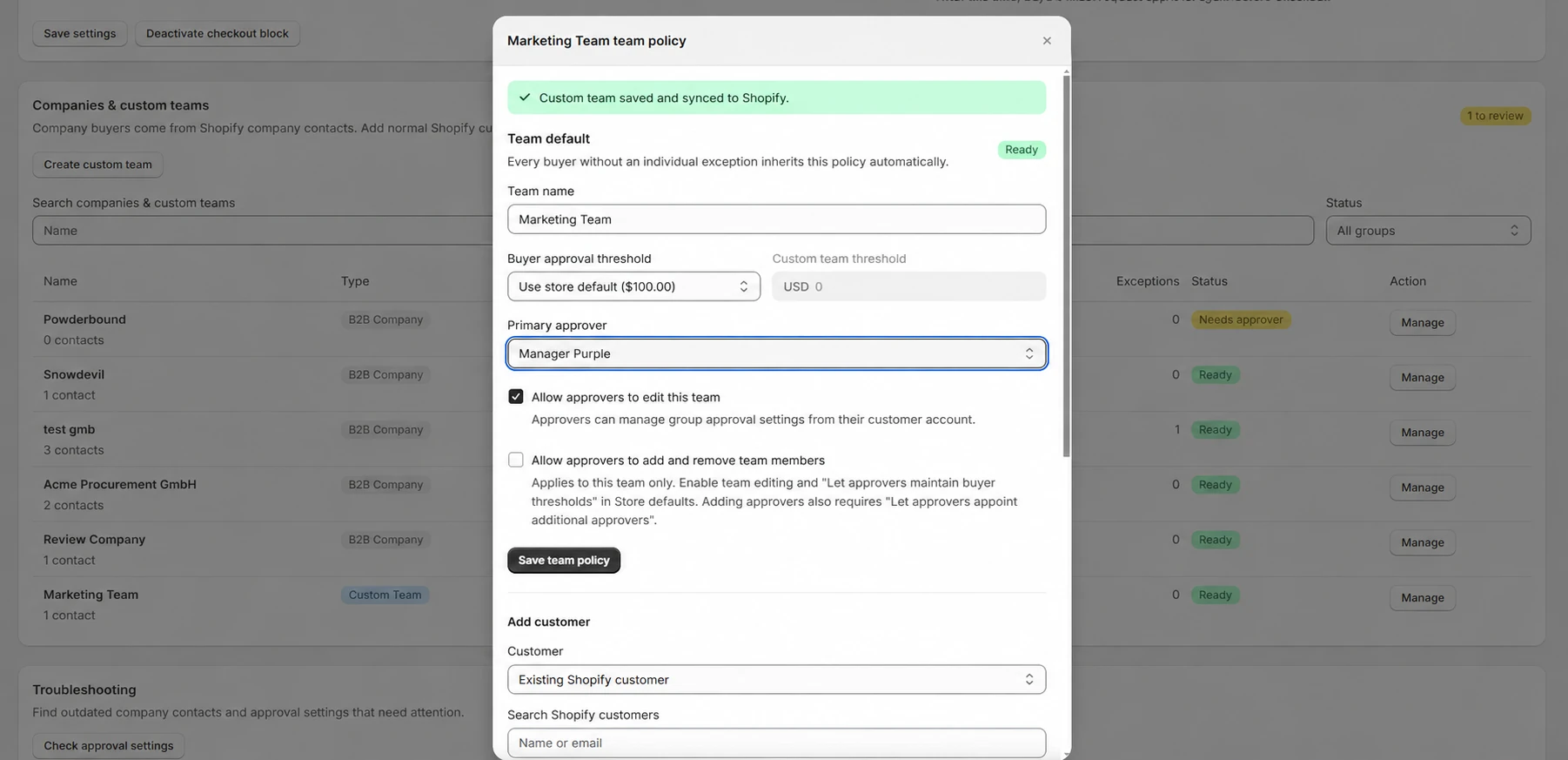
Choose a primary approver, set the team threshold, and add buyer exceptions or a different approver where needed.
Signed-in buyers submit carts when approval is required. The assigned approver reviews and decides in their customer account.
Inside ApproveCart
Choose the team's threshold and primary approver, then decide which settings approvers can maintain themselves.
Team policy, personal exceptions
Use one default for the store, a policy for the team, and an individual threshold for buyers with different purchasing authority.
Approval is required when the cart exceeds the effective threshold. Growth can also require approval for matching product, collection, and cart conditions.
Understand threshold inheritanceExample team
From request to checkout
Both sides can refine a pending request. Approval protects the final saved cart, and the buyer restores that version to complete checkout.
The buyer signs in and shops as a member of a custom team or Shopify B2B company.
The buyer or assigned approver can adjust quantities, remove items, or add products available to the buyer.
The assigned approver receives an email with the request details and a link to review it.
The buyer restores the final approved cart and checkout protection validates that exact version.
After approval or rejection, the buyer receives the decision by email.
Team control on Growth
Enable policy self-management so approvers can maintain buyer thresholds. You can also give a custom team's approvers permission to add and remove members from their customer account.
Fit with your store
Pick the supported account types during setup. You can change them later in Settings; stored teams and requests remain available when reactivated.
Use the regular store catalog and shop currency. A customer can have one active custom team. Team approvals use signed-in customer identities.
See setup and current limitsUse your existing company and location context for B2B catalogs, pricing, and payment terms, with ApproveCart adding internal purchase approval.
See the B2B workflowCustom team FAQ
Custom teams use regular Shopify customers and the regular store catalog. Create a team in ApproveCart and assign its buyers and approvers without creating a Shopify company or company location.
The merchant adds existing Shopify customers or creates customers while adding them. Membership takes effect immediately. An optional notification email tells the customer their team and role; there is no invitation to accept.
On Growth, the merchant can enable approver policy self-management. For a custom team, the merchant can also allow approvers to add and remove members. Appointing additional approvers requires the separate merchant permission.
A customer can belong to one active custom team per shop. A Shopify B2B company membership can also exist; the team and company purchasing contexts remain separate.
Custom teams use the regular store catalog and approvals in the shop currency. They do not create B2B catalogs, pricing, company locations, or payment terms.
Start with a 7-day free trial
Add a buyer and an approver, set a team threshold, and test the complete flow with your regular Shopify customer accounts.